Blog
RELX Pod Pro 2 Won't Hit? Complete Fix Guide

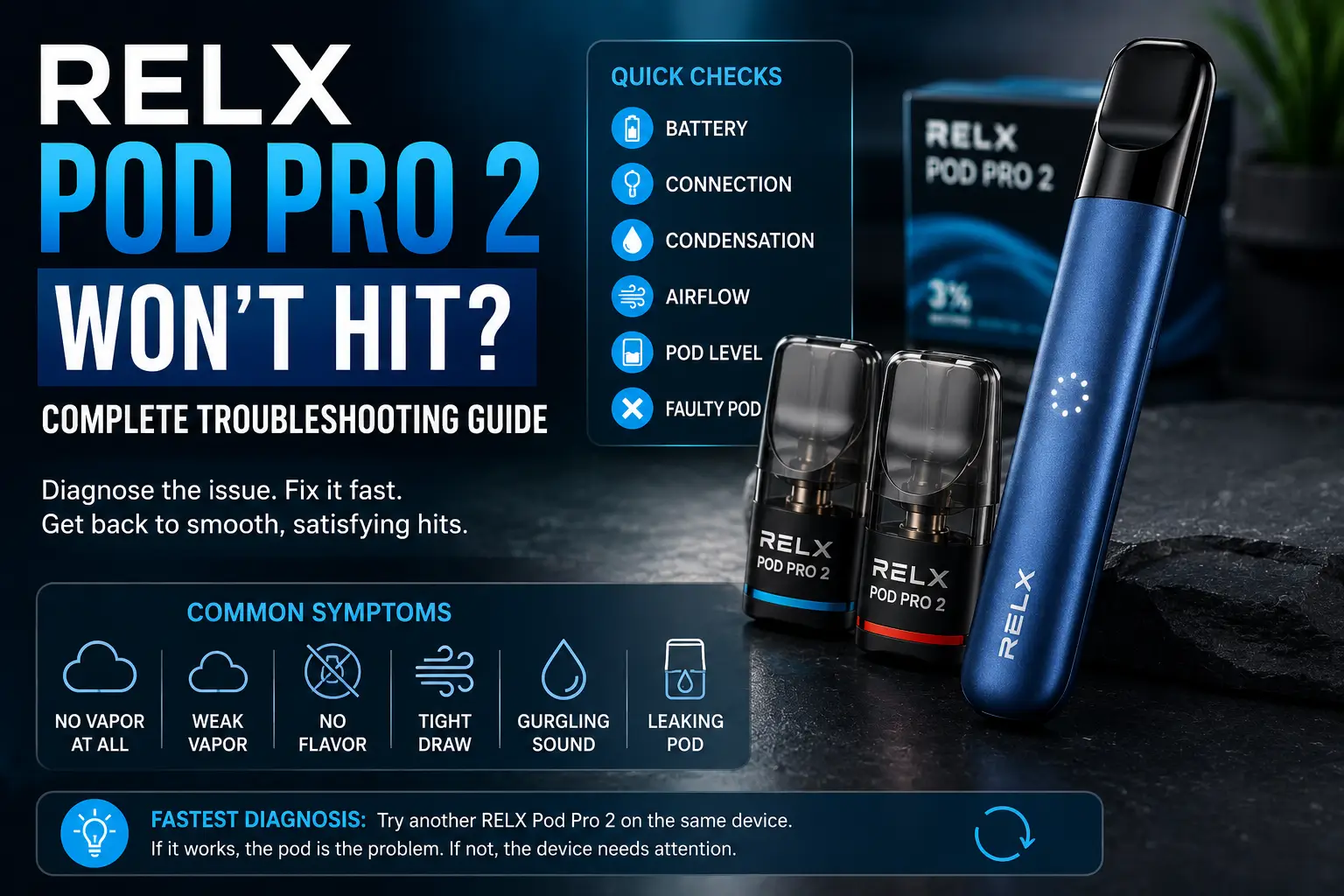
If your RELX Pod Pro 2 won’t hit, the cause is usually one of a few things: the pod isn’t seated correctly, the compatible RELX device battery is low, condensation is sitting on the connection, airflow is restricted, or the pod itself is empty or faulty. This guide works through each cause in order so you can find yours without guesswork.
RELX Pod Pro 2 is the pod, not the battery device itself. If a pod from the RELX Pod Pro 2 flavor range isn’t working, the problem can sit with the pod or with the compatible RELX device that powers and detects it, such as Infinity 2 or Artisan. The steps below will tell you which one is responsible.
Quick Diagnosis: What’s Causing the Problem?
| What you’re experiencing | Likely cause | First thing to try |
|---|---|---|
| No vapor at all | Battery, connection, or pod | Charge the device and reseat the pod |
| Weak vapor | Low liquid, airflow, or connection | Check the liquid level and airflow |
| No flavor | Low or old pod, or condensation | Try a fresh pod |
| Tight draw | Restricted airflow | Check airflow |
| Gurgling | Excess liquid or condensation | Clean the accessible area |
| One pod fails | Faulty pod | Try another pod |
| Several pods fail | Device or connection issue | Inspect the device |
Fastest diagnosis: Try another compatible RELX Pod Pro 2 on the same device. If the second pod works, the original pod is likely the problem. If both fail, the compatible device, its battery, or the connection needs attention.
Before You Start Troubleshooting
- Use a compatible RELX device, such as Infinity 2 or Artisan.
- Remove the pod before inspecting the connection area.
- Don’t open, puncture, or modify the sealed pod.
- If there’s significant leakage or visible damage, stop using the pod.
If you’re dealing with a different symptom, such as charging, blinking lights, or a JUUL device, see this broader JUUL and RELX troubleshooting guide for the full diagnostic path.
Why Is My RELX Pod Pro 2 Not Hitting?
A pod that won’t hit usually traces back to one of these: incorrect seating, a low compatible RELX device battery, dirty or damp contacts, restricted airflow, an empty pod, leftover packaging on a new pod, or the device not recognizing the pod. The sections below walk through each one in the order that resolves problems fastest.
How to Fix a RELX Pod Pro 2 That Won’t Hit
1. Check the Compatible RELX Device Battery
Confirm the compatible RELX device has enough charge, then test the pod again. A low charge on the device can look exactly like a pod problem even when the pod is fine.
If the device isn’t charging at all, see this guide to a RELX device that won’t charge.
2. Remove and Reseat the Pod
Take the Pod Pro 2 out, check the pod and connection area for anything out of place, then reinsert it firmly and evenly. Take a slow, steady draw to test it.
3. Clean the Pod and Device Contacts
Check the bottom of the pod and the pod bay for residue. Wipe any condensation or e-liquid away with a dry cotton swab or clean tissue rather than a liquid cleaner, then reinstall and test.
4. Check for Condensation or E-Liquid Buildup
Moisture around the connection can prevent a reliable contact between pod and device, which often shows up as weak or missing vapor. Wipe away anything visible on the surface, but don’t open the pod or device to look further inside.
5. Check the Pod’s Airflow
Signs of restricted airflow include a tight draw, very little vapor on a full pull, or a gurgling sound. Don’t puncture or modify the pod to try to fix airflow. If it’s genuinely restricted, the pod usually needs replacing.
6. Check the Pod’s E-Liquid Level
An empty or nearly empty pod is one of the simplest explanations for weak vapor or faded flavor. Once a pod is finished, replace it rather than continuing to troubleshoot it.
7. Check a New Pod’s Packaging or Seal
If the pod is brand new, make sure any protective packaging has been fully removed before installing it, following the instructions included with the product. Leftover packaging can interfere with airflow or the connection.
8. Test Another RELX Pod Pro 2
This is the single most useful diagnostic step. If a second pod, such as RELX Pod Pro 2 Mango, works normally on the same device, the original pod was likely the problem. If several pods fail the same way on the same device, the issue is more likely the device or its connection.
RELX Pod Pro 2 Symptoms and Specific Fixes
Lights Up but Produces No Vapor
This means the device is activating, but the connection, airflow, or pod isn’t delivering vapor. Start with step 2 and step 4, then move to step 5 if the problem continues. Test a second pod using step 8 if none of those resolve it.
Weak Vapor or a Weak Hit
Weak vapor can result from a low pod, condensation, a partial connection issue, or a device that needs charging. Check step 6 and step 1 first, since these are the two most frequent causes, then work through the remaining steps if needed.
For a closer look at why output can drop over time, see this breakdown of reduced vapor output on RELX devices.
No Flavor or Weak Flavor
- Nearly empty pod: flavor is often the first thing to fade as a pod runs low.
- Condensation: buildup can dull flavor even when vapor production still looks normal.
- Pod age and storage: pods stored for a long time or exposed to heat can lose flavor intensity.
- Try a fresh pod: if a new pod, such as RELX Pod Pro 2 Strawberry Burst, tastes noticeably stronger, the original had simply reached the end of its life.
Gurgling but Won’t Hit
Gurgling usually points to excess liquid sitting near the connection, often from condensation. Clean the accessible area as in step 3, and avoid tilting or shaking the pod to try to clear it. If gurgling continues after cleaning, the pod has likely reached the point where it should be replaced.
Leaking and Won’t Hit
Small amounts of condensation around the connection can be wiped away following step 3. Repeated or significant liquid leakage is a different issue and isn’t something to clean your way out of; a visibly damaged or persistently leaking pod should be replaced. Leaking can also block airflow, since escaped liquid can sit in the draw path. For more on prevention, see this RELX Pod Pro leakage guide.
Burnt Taste and Won’t Hit Properly
A persistent burnt taste can indicate that the pod is nearing the end of its usable life or that the internal wicking system is no longer producing normal flavor, which is different from weak flavor (usually a low pod or airflow issue) or no vapor (usually connection, battery, or airflow). If the taste stays burnt rather than just weak, replacing the pod is typically faster than continuing to troubleshoot it.
See this fix guide for RELX and JUUL pods tasting burnt for more detail.
Isn’t Recognized by the Device
Reseat the pod (step 2), clean the contacts (step 3), and check for condensation (step 4). Then test a different pod (step 8). If one pod isn’t recognized but others are, the pod is the likely cause. If no pod is recognized, the device connection needs attention.
Won’t Hit With a New Pod
A new pod that won’t hit usually comes down to one of these: leftover protective packaging, incorrect seating, condensation on the connection, or a defective unit. Work through step 7 first, then step 2 and step 3. If it still won’t hit, test it against a different compatible device before assuming the pod itself is faulty, since this rules out a device-side issue.
Won’t Hit After Sitting Overnight
A pod that worked yesterday but doesn’t activate today is a common report. Check pod seating (step 2), condensation on the connection (step 4), the compatible device’s battery (step 1), and airflow (step 5). If those don’t resolve it, test the pod on a different compatible device or test a fresh pod on the same device (step 8) to isolate which side the fault is on.
How to Tell If the Pod or Device Is the Problem
| What happens | Likely issue | What to try |
|---|---|---|
| One pod doesn’t work | Pod problem | Try another pod |
| Several pods don’t work | Device or connection problem | Clean, charge, and inspect the device |
| Pod works after cleaning | Condensation or contact issue | Keep the connection area clean |
| Device activates but no vapor | Pod or airflow issue | Check the pod and airflow |
| Pod is empty | Pod has reached end of use | Replace the pod |
| Visible leakage | Pod or liquid issue | Stop using if damaged or leaking excessively |
What Not to Do When a RELX Pod Pro 2 Won’t Hit
- Don’t open or puncture the sealed pod.
- Don’t insert sharp or metal objects into the pod or device.
- Don’t force the pod into the device.
- Don’t continue using a visibly damaged pod.
- Don’t attempt internal repairs on the device.
- Don’t charge a device that appears seriously damaged or affected by liquid.
When Should You Replace Your RELX Pod Pro 2?
- The pod is empty.
- A burnt taste persists after basic checks.
- Leaking continues or is more than minor.
- The pod is visibly damaged.
- The same pod keeps failing the same way.
- A different, fresh pod works normally on the same device.
Once you’ve confirmed it’s the pod and not the device, pick up a fresh one such as RELX Pod Pro 2 Watermelon Ice rather than continuing to troubleshoot a pod that’s reached the end of its life.
What to Do If Your RELX Pod Pro 2 Still Won’t Hit
- Test a fresh pod on the same compatible device.
- If multiple pods fail, the device may be the issue rather than the pod.
- Don’t disassemble the device to investigate further.
- Contact official RELX support if the problem persists.
Troubleshooting note: This guide focuses on pod-level checks that can be performed without opening or modifying the sealed pod. Device-level faults should be handled according to the manufacturer’s support guidance.
Frequently Asked Questions
Why is my RELX Pod Pro 2 not hitting?
Usually a low device battery, a pod that isn’t seated correctly, condensation on the connection, restricted airflow, or a pod that’s empty or faulty. The Quick Diagnosis table above points to the right first step.
Why does my RELX Pod Pro 2 have no vapor even though the device activates?
This usually points to the pod connection or airflow rather than the battery. Reseat the pod, check for condensation, and check airflow before assuming the pod is faulty.
Why does my RELX Pod Pro 2 have weak flavor?
Commonly caused by a nearly empty pod, condensation buildup, or a pod that’s been stored for a long time.
Why is my RELX Pod Pro 2 gurgling or leaking?
Both usually point to excess liquid near the connection. Minor condensation can be wiped away; repeated or significant leakage means the pod should be replaced.
How can I tell if the pod or device is faulty?
Test a second pod. One pod failing points to the pod. Several pods failing the same way points to the device.
Why won’t my new RELX Pod Pro 2 work?
Double-check that any protective packaging has been fully removed and that the pod is seated correctly before assuming it’s faulty.
Does the RELX Pod Pro 2 work with every RELX device?
No. It’s designed for specific compatible devices, such as Infinity 2 and Artisan. Using it with an unsupported device can cause it to not activate at all.
Why does my RELX Pod Pro 2 work on one device but not another?
This points to a device-side issue rather than the pod, such as a connection fault, low battery, or a compatibility mismatch. Test the pod on a known-working compatible device to confirm.
When should I replace my RELX Pod Pro 2?
Once it’s empty, consistently burnt-tasting, leaking, damaged, or still not working after the basic troubleshooting steps.
Final Verdict
If your RELX Pod Pro 2 won’t hit, first determine whether the problem follows the pod or stays with the device. Testing another compatible pod is the quickest way to separate the two. If multiple pods fail on the same device, the device or its connection is more likely responsible than the pods themselves.
If the issue continues after working through these steps, reach out to official RELX support, or browse the full range at RELX Dubai for a fresh pod or device.