

Your JUUL flashes a color you’ve never seen before, and suddenly you’re staring at the device wondering if it’s dying, broken, or just doing its job. That confusion is the single most common reason people message us at Pod Seller.ae asking whether they need a replacement device or a replacement pod. Most of the time, it’s neither. The LED on a JUUL is a small diagnostic system: it’s telling you something specific about battery level, pod connection, or a firmware state, and once you can read it, the guesswork disappears.
This guide walks through every JUUL blinking light meaning across the original JUUL device and the JUUL 2 device, explains why each pattern happens, and gives you the exact fix for each one. No filler, no vague “try restarting it” advice, just what the light means and what to do next.
How the JUUL LED System Actually Works
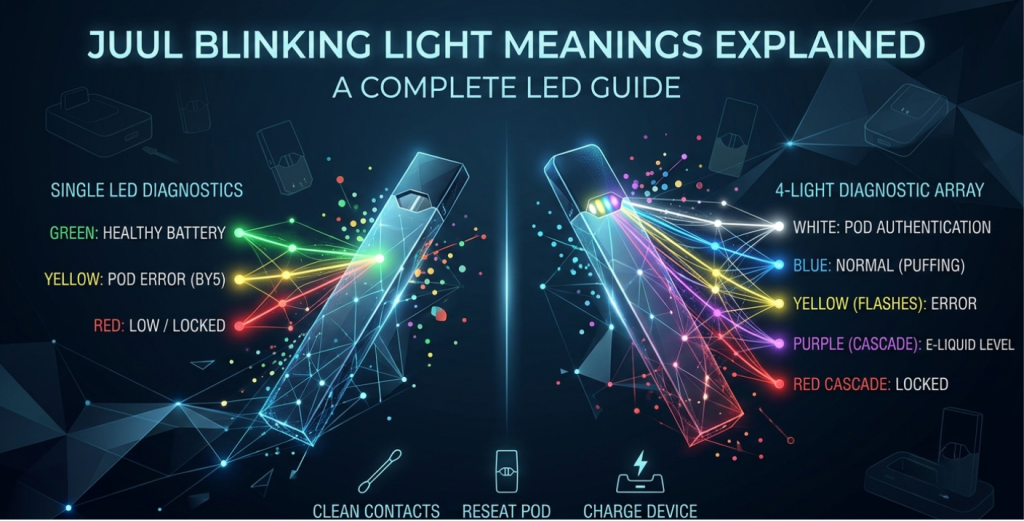
The original JUUL uses a single LED near the bottom of the device. It communicates through color and blink count: a steady color while you puff, a specific number of flashes when you tap it or plug it in to charge. The JUUL 2 expanded on this with a four-light array and added white and purple signals tied to pod authentication and e-liquid level, since the JUUL 2 pairs with the JUUL 2 app for extra diagnostics.
Neither device has a screen, so the LED has to carry all of that information through color and rhythm. That’s efficient once you know the code, but it’s genuinely opaque the first time you see purple lights racing across the device or a light that won’t stop blinking red. Below is the breakdown, color by color.
Green Light: Battery Is Healthy
Solid or single-flash green light when you tap the device or take a puff means the battery is in good shape, generally above 50–60% charge. A JUUL blinking green is totally normal and indicates a full or near-full battery.
If you see five green blinks while charging, that’s the device telling you it’s nearly finished topping up. This is a normal charging signal, not an error, though it’s worth knowing what can trigger it beyond a simple full charge:
- Using a non-official charger, since the device is calibrated for the JUUL magnetic USB dock
- A battery that was fully drained and is taking a slower final stretch to 100%
- Natural battery aging after roughly six months to a year of regular use, which can make the “nearly full” signal appear earlier than it used to
If your device used to hold a charge all day and now taps out by lunchtime, that’s usually battery degradation rather than a defect: lithium-ion cells in small vapes typically lose meaningful capacity after several hundred charge cycles. For a deeper look at charge cycles and what to expect over time, check our “JUUL 2 Battery Life Guide”.
Yellow Light: Medium Battery or a Pod Error
Context matters here because yellow means two very different things depending on when it appears.
During normal use, a yellow flash simply means the battery is sitting in the middle range, not low, not full. No action needed.
Five yellow blinks right after inserting a pod is a different story. This is JUUL’s BY5 error code, and it points to a pod-recognition problem rather than the battery. JUUL’s own support guidance is straightforward here: try a different JUULpod, such as a fresh Virginia Tobacco pod, ideally from a separate package, and watch what happens. If every pod you test triggers the same yellow blinking, the fault sits with the device itself. If only certain pods cause it, those individual pods are likely defective. Persistent BY5 errors across multiple pods and packages are a signal to contact JUUL Care rather than keep swapping pods indefinitely.
Red Light: Low Battery, Locked Device, or Both
A single red flash is the most common one you’ll encounter: it means the battery has dropped low and needs charging soon. Put it on the magnetic dock before assuming anything else is wrong.
All four lights on a JUUL 2 glowing red points to something different: the device is locked. The JUUL 2 Starter Kit Device ships with a companion app that includes an optional lock feature, and this red pattern shows up when that lock is active. You’ll need to unlock it through the app rather than the device itself. If the device also shows a pulsing white light while it’s locked and charging, keep it on the charger until the pulsing stops before trying to unlock or use it.
Blue Light: Normal Operation, With a Few Exceptions
Blue is the “everything’s working” color on most JUUL devices. A single blue flash while puffing confirms the airflow sensor detected your draw and the device fired correctly. That’s it, no issue at all.
Where blue gets confusing is the five-blink pattern on special/limited color JUUL devices, such as the JUUL Silver Device. Unlike the standard yellow or green five-blink signals, this one isn’t something you troubleshoot at home. According to JUUL’s official guidance, if your special colour JUUL device is blinking blue 5 times, you should contact the JUUL Care team. There isn’t a published home fix for this particular code, so skip the DIY cleaning cycle and go straight to support if you see it.
Rapid, irregular blue flashing while the device is idle (not while puffing) is usually a pod connection issue: dirty contacts, a pod that isn’t fully seated, or occasionally a third-party pod with electrical characteristics the device doesn’t fully recognize.
Purple, White, and Rainbow: JUUL 2-Specific Signals
The JUUL 2’s expanded LED array introduced signals the original JUUL never had.
White light after inserting a pod confirms pod authenticity: white lights flash to indicate your JUUL 2 pod is authentic, whether it’s a Crisp Menthol pod or a Blackcurrant Tobacco pod, while purple lights flash to indicate the pod’s remaining e-liquid level. So a purple flash isn’t a warning by default; it’s often just the device reporting how much juice is left.
Purple or rainbow flashing that appears unexpectedly, rather than right after a pod swap, typically points to a pod recognition problem or an internal diagnostic error. Before assuming the worst, reseat the pod firmly and wipe the gold contacts on both the pod and the device with a dry cotton swab or a cotton swab lightly dampened with isopropyl alcohol. Dust and residual e-liquid on those contacts cause a surprising share of “my JUUL is glitching” reports. If you’re unsure whether a pod is genuine in the first place, our “How to Verify Your JUUL 2 Pods Are Real & Safe to Use” walks through the checks in more detail.
A purple-to-red blinking cycle on the original JUUL is JUUL’s documented pattern for a pod-related fault. Try a pod from a different package first; if the same cycle repeats across multiple pods, the device itself is the likely cause.
Quick Reference Table
| Light Pattern | What It Usually Means | What To Do |
|---|---|---|
| Solid/single green | Battery healthy | No action needed |
| 5 green blinks (charging) | Nearly fully charged | Let it finish; use the official charger |
| Yellow during use | Medium battery | No action needed |
| 5 yellow blinks (pod inserted) | Pod recognition error (BY5) | Try a different pod/package; contact support if it persists |
| Single red flash | Low battery | Charge on the magnetic dock |
| All 4 lights red (JUUL 2) | Device locked | Unlock via the JUUL 2 app |
| Single blue flash (puffing) | Normal operation | No action needed |
| 5 blue blinks (Special/Limited Colour) | Requires support for diagnosis | Contact JUUL Care |
| White after pod insert (JUUL 2) | Pod authenticated | No action needed |
| Purple flash (JUUL 2) | E-liquid level indicator | No action needed |
| Unexpected purple/rainbow | Pod or internal error | Reseat the pod, clean the contacts. |
| Purple-to-red cycle | Pod-related fault | Test a different pod |
When a Blinking Light Means It’s Time for a New Device
Most blinking lights resolve with charging, reseating the pod, or a contact cleaning. But there’s a point where persistent errors tell you the hardware itself has reached the end of its life, usually after six to twelve months of daily use, or when the battery no longer holds even a short charge. If you’ve tried multiple pods, cleaned the contacts, and used the official charger, and the same error keeps returning, that’s your signal to retire the device rather than keep chasing a fix.
At Pod Seller.ae, we stock genuine JUUL devices, including the JUUL 2 Device Slate Grey, and pods sourced with authenticity in mind, so you’re not left guessing whether a light error is a device fault or a counterfeit pod issue, a problem that’s far more common with pods bought from unverified sellers.
Frequently Asked Questions
Why is my JUUL blinking and not charging?
Usually dirty charging contacts. Clean the device and dock, then try a different USB port.
Is a purple light on my JUUL 2 always bad?
No, right after a pod swap, it’s just showing the e-liquid level; it’s only a problem if it flashes unexpectedly during normal use.
How many times should a JUUL blink when charging?
Five blinks near your battery color (usually green) mean it’s nearly fully charged. That’s normal, not an error.
What does it mean if my JUUL blinks different colors randomly?
It usually points to a loose or dirty pod connection, not battery health. Reseat the pod and clean the contacts.
Can a blinking light mean my pod is fake?
Indirectly, pods with inconsistent electrical characteristics (common with counterfeits) can trigger recognition errors, so buy from a verified source.
Looking for genuine JUUL pods and devices in the UAE?
Browse our verified range at Pod Seller, or get in touch if you’re still not sure what your device’s blinking light means. We’re happy to help you figure it out before you replace anything.
Shop genuine JUUL & RELX pods
100% authentic · 1-hour delivery in Dubai, Ajman & Sharjah · 18+