

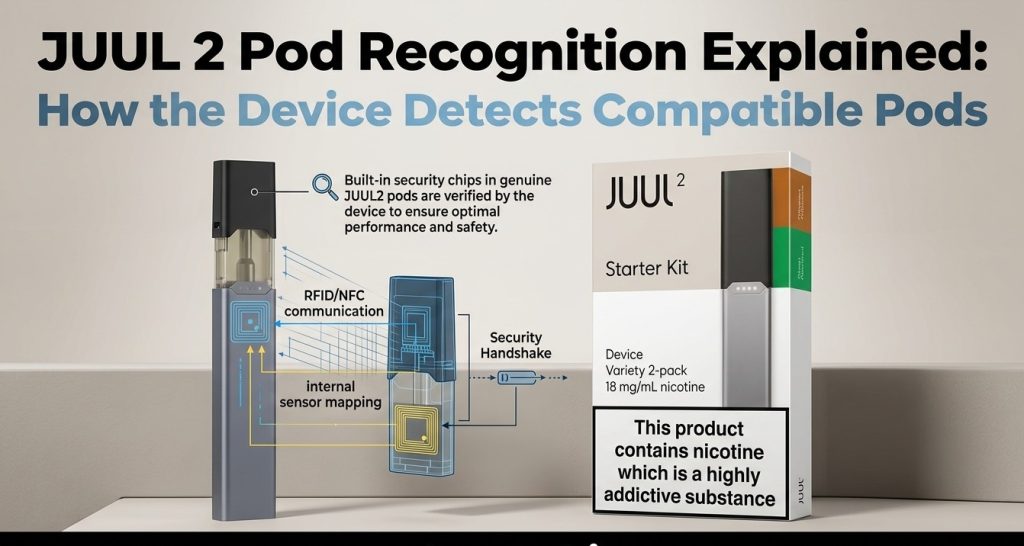
You push a pod into your JUUL 2 Device, the lights flash, and it won’t fire. Before you blame the pod or the battery, it helps to know what the device is doing in those first few seconds. Here’s how JUUL 2 recognizes a pod, what the lights are telling you, and what to check when a pod gets rejected. This is for adult users only, and nicotine is addictive.
How JUUL 2 Pod Recognition Works
Every JUUL 2 pod has a unique, encrypted ID chip inside it. When you insert a pod, the device reads that ID and checks whether it can authenticate it. If it can, the device works as normal. If it can’t, it signals a problem and won’t produce vapor. The system is called PodID.
What Is PodID Technology?
Think of PodID as a quick handshake between the pod and the device.
- The device checks the pod’s ID as soon as it’s inserted.
- Authentication helps it tell recognized pods from unauthenticated ones.
- The system is built so unauthorized pods don’t operate on the device.
There’s a limit to what it tells you, though. PodID checks the ID, not everything about the pod. It can’t tell you how the pod was stored or what condition it’s in.
Want the full background on how PodID works? Read our guide to JUUL 2 smart pods and PodID technology.
What Happens After You Insert a JUUL 2 Pod?
- You insert a compatible JUUL 2 pod.
- The device reads the pod’s ID chip.
- It checks whether the pod can be authenticated.
- The lights show you the result.
- If it passes, you’re good to go, as long as the device is charged and unlocked.
How to Tell Whether JUUL 2 Has Recognized a Pod
You don’t need to be technical for this. The lights tell you most of it. Here’s what to look for.
| JUUL 2 light signal | What it may indicate |
|---|---|
| Four white lights flash after insertion | The pod was recognized |
| Purple lights flash afterward | Shows how much e-liquid is left |
| Two red lights alternate left to right | The pod is incompatible or couldn’t be authenticated |
| No vapor, even after insertion | Could be a compatibility issue, low battery, a locked device, or another fault |
Light behavior can vary by regional version, so check the instructions for your exact device. Also, don’t mix up pod signals with the battery indicator or the device-lock signal. They mean different things.
Need more detail on light patterns? Our JUUL blinking light meanings guide explains each one.
Why JUUL 2 May Reject a Pod
The Pod Is for the Original JUUL
JUUL and JUUL 2 use different pod systems. Just because you recognize the flavor name doesn’t mean the pod fits. JUUL 2 is designed for JUUL 2 pods, so an original JUUL pod is the most common reason for a rejection.
If you’re moving over from the JUUL 1 pods, you’ll need a JUUL 2 device too. You can choose between the JUUL 2 Device in Slate Grey and the JUUL 2 Starter Kit.
Still using an original JUUL? Our guide to JUUL silver device accessories covers what you actually need.
The Pod Can’t Be Authenticated
If the PodID system doesn’t accept a pod, it won’t operate, and the device shows the rejection signal. In that case, use a compatible pod and follow the manufacturer’s troubleshooting guidance. Don’t modify the pod or try to bypass the authentication system.
The Pod Isn’t Fully Inserted
A pod that isn’t seated properly can cause a connection problem. Take it out and push it back in gently, following the manufacturer’s instructions.
The Device Is Locked or Low on Battery
Pod recognition isn’t the only reason a device won’t work. A locked device or a low battery can stop it even when the pod is perfectly compatible.
How to Troubleshoot a JUUL 2 Pod Recognition Problem
Go through these in order. They’re all simple and safe.
- Confirm the pod generation. Check the packaging and product name to make sure it’s a JUUL 2 pod, not an original JUUL pod.
- Remove and reinsert the pod. Take it out and reattach it gently. Never force it.
- Check the charge. If the battery is low, charge the device as the manufacturer instructs.
- Check whether the device is locked. If it shows the lock signal, follow the manufacturer’s unlock instructions for your exact device and region.
- Stop if the pod is still rejected. Check the manufacturer’s support guidance or contact your retailer. Don’t modify the pod or try to bypass authentication.
If a pod or device is leaking, damaged, unusually hot, or acting strangely, stop using it instead of testing it again and again.
Still stuck? Our guide on why a JUUL isn’t detecting a pod covers more causes and fixes.
Does JUUL 2 Pod Recognition Mean a Pod Is Genuine?
Not entirely. Three different things often get mixed up:
- Recognition: the device accepts the pod’s ID.
- Product verification: the product’s origin and packaging are checked through the manufacturer or a trusted retailer.
- Product condition: how the pod was stored and whether it’s intact is a separate question.
PodID is designed to authenticate pods, but a light signal isn’t a full guarantee about storage history, condition, or every aspect of legitimacy. For packaging and origin, check the product details and buy from a retailer you trust.
For common misconceptions, read our piece on pod vaping myths about RELX and JUUL.
JUUL 2 Pod Compatibility: Which Pods Fit Which Device
The easiest way to avoid a recognition problem is to match the pod to the device before you buy. Each system works only with its own pods:
- JUUL 2 device: works with JUUL 2 pods only. Our JUUL 2 pods come in packs of two, with 1.2 mL of e-liquid per pod.
- Original JUUL device: works with original JUUL pods only. Those come in packs of four, with 0.7 mL per pod. If you’re still on the original, browse the original JUUL devices to find one that suits your pods.
Take JUUL 2 Virginia Tobacco Pods as an example. The flavor name also exists for the original JUUL, but this pod is made for JUUL 2 devices only. Always check the device name on the listing, not just the flavor.
For strength and pod size, see JUUL pods nicotine content explained.
JUUL 2 PodID vs the Original JUUL Pod System
Here’s the difference that matters for pod recognition.
| Feature | Original JUUL | JUUL 2 |
|---|---|---|
| Pod system | Original JUUL pods | JUUL 2 pods |
| PodID authentication | Don’t assume it works the same way | Unique encrypted pod ID |
| Cross-generation compatibility | Original pods don’t fit JUUL 2 | Designed for JUUL 2 pods |
| Recognition feedback | Check the instructions for your original device | Includes authentication-related light signals |
Final Thoughts
JUUL 2 recognition comes down to a simple check between the pod and the device. Match the pod to the device, seat it gently, and keep the device charged and unlocked, and most problems sort themselves out. You can browse the full range at RELX Dubai.
Frequently Asked Questions
How does JUUL 2 recognize a compatible pod?
It reads the pod’s unique ID chip and checks whether the pod can be authenticated.
Why does my JUUL 2 flash two red lights when I insert a pod?
In the documented UK model, two alternating red lights mean an incompatible pod. Check the instructions for your regional version before applying this to another device.
Can original JUUL pods work in JUUL 2?
No. The two use separate pod systems, and original pods aren’t designed for JUUL 2.
Does JUUL 2 use a chip to detect pods?
Yes. JUUL 2 pods contain a unique, encrypted PodID chip used for authentication.
Can a compatible-looking third-party pod work in JUUL 2?
Fitting physically doesn’t mean it’s authenticated. JUUL 2 is designed to work with authenticated JUUL 2 pods.
What should I do if my genuine JUUL 2 pod is rejected?
Check the pod generation, reinsert it correctly, and make sure the device is charged and unlocked. If it keeps happening, contact the manufacturer or your retailer.
This guide is for adults only, and nicotine is addictive.
Shop genuine JUUL & RELX pods
100% authentic · 1-hour delivery in Dubai, Ajman & Sharjah · 18+